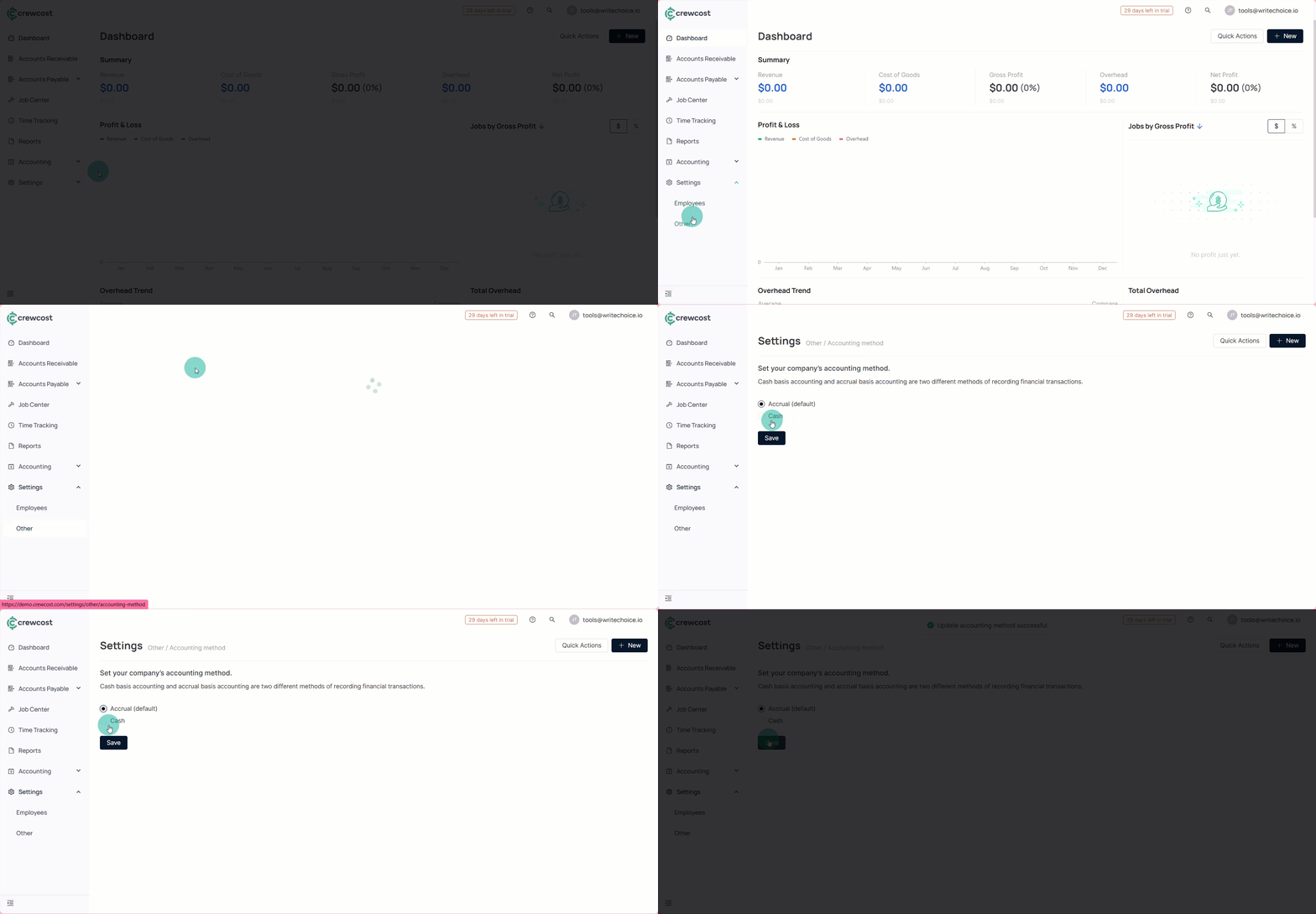
Choose an Accounting Method

Learn how to select the accounting method that matches how your business records revenue and expenses. Whether you use cash or accrual accounting, choosing the right method ensures your financial reports and project data stay accurate and aligned with your workflow.

To change your company’s accounting method:

  1. On the left menu, go to Settings > Other > Accounting method.

  2. Choose your company’s accounting method:

Field
Descript

Accrual

In this method, revenue and expenses are recorded when earned or incurred, regardless of when the cash is received or paid. This provides a more accurate picture of a company's financial health, including all transactions related to a given period, not just those where money changed hands.

Cash

This method records revenue and expenses only when cash is received or paid. It's straightforward and often used by smaller businesses or individuals. For example, using this method, you record income when you receive payment and expenses when you pay a bill.

  1. Select Save to complete the process.

Once your accounting method is set, you’re ready to keep building a financial structure that works for your business.

See also

Keep exploring our platform by taking the next step:

Last updated

Was this helpful?