> For the complete documentation index, see [llms.txt](https://docs.crewcost.com/llms.txt). Markdown versions of documentation pages are available by appending `.md` to page URLs; this page is available as [Markdown](https://docs.crewcost.com/documentation/work-breakdown-structure/use-cost-types.md).
# Use Cost Types
Cost Types work together with Cost Codes to help you organize and track project costs in detail. While Cost Codes describe the type of work being performed, Cost Types describe how the money is spent, such as labor, materials, equipment, subcontractors, or other costs. This structure supports accurate budgeting, job costing, and financial reporting.
To use and create a cost type:
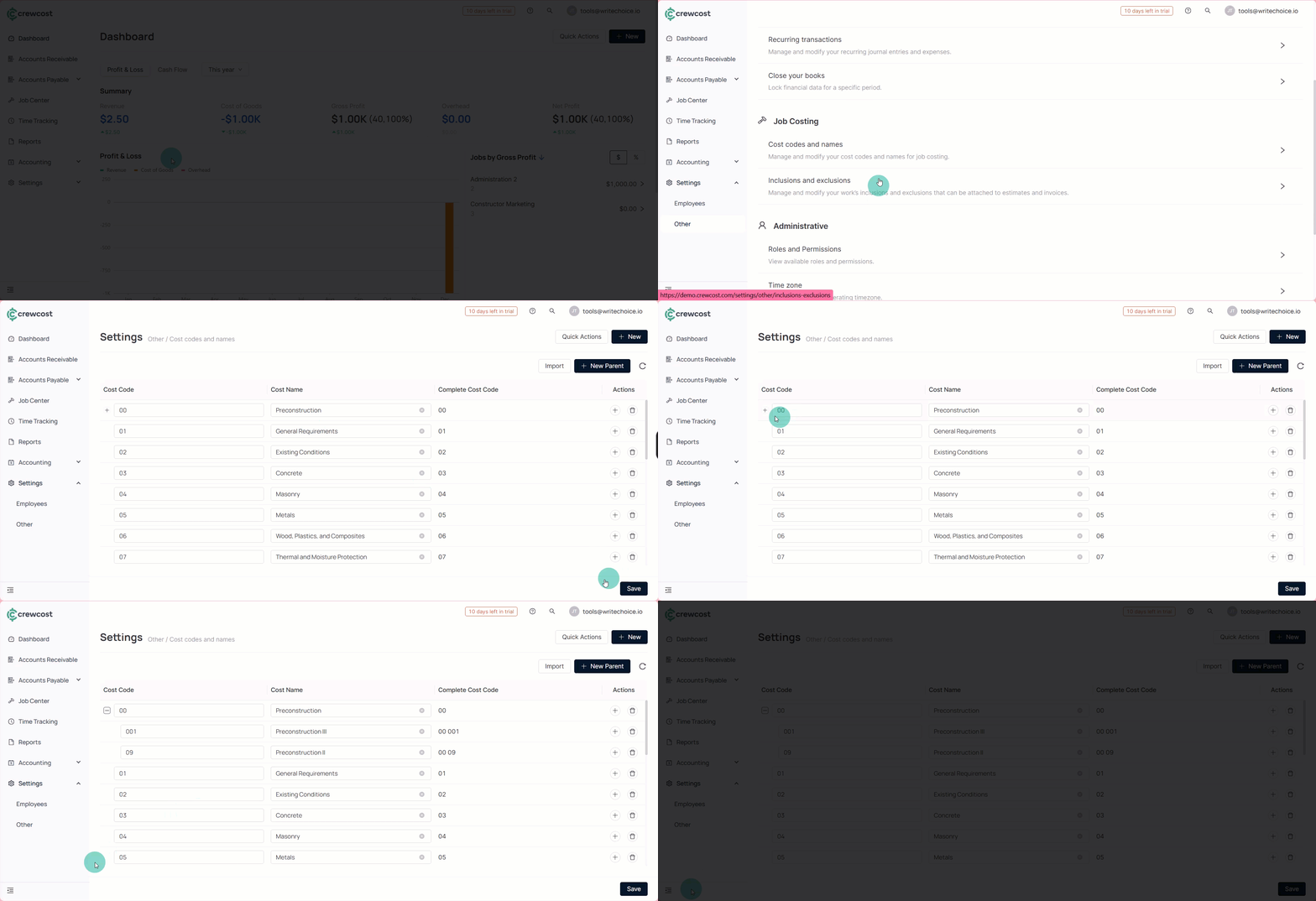
1. Go to **Settings > Other > Cost Codes and Names**.
2. Create [Cost Codes](/documentation/work-breakdown-structure/add-a-new-cost-code.md) that reflect how work is structured in your organization, with up to 3 levels so detailed codes can roll up to higher-level categories.
3. Review the default **Cost Types** (named as **Cost Names**) available for each **Cost Code**, such as Labor, Materials, Equipment, Subcontract, and Other.
{% hint style="info" %}
Cost Types are standardized categories that map directly to the general ledger and are available for every Cost Code.
{% endhint %}
4. Select **Save** to complete the process.
{% hint style="info" %}
This procedure happens before any estimating or job work and is typically done by an administrator.
{% endhint %}
### Use Cost Types During Estimation, Job Creation, and Billing
This procedure covers the day-to-day operational use of Cost Types after the setup is complete.
To use cost types:
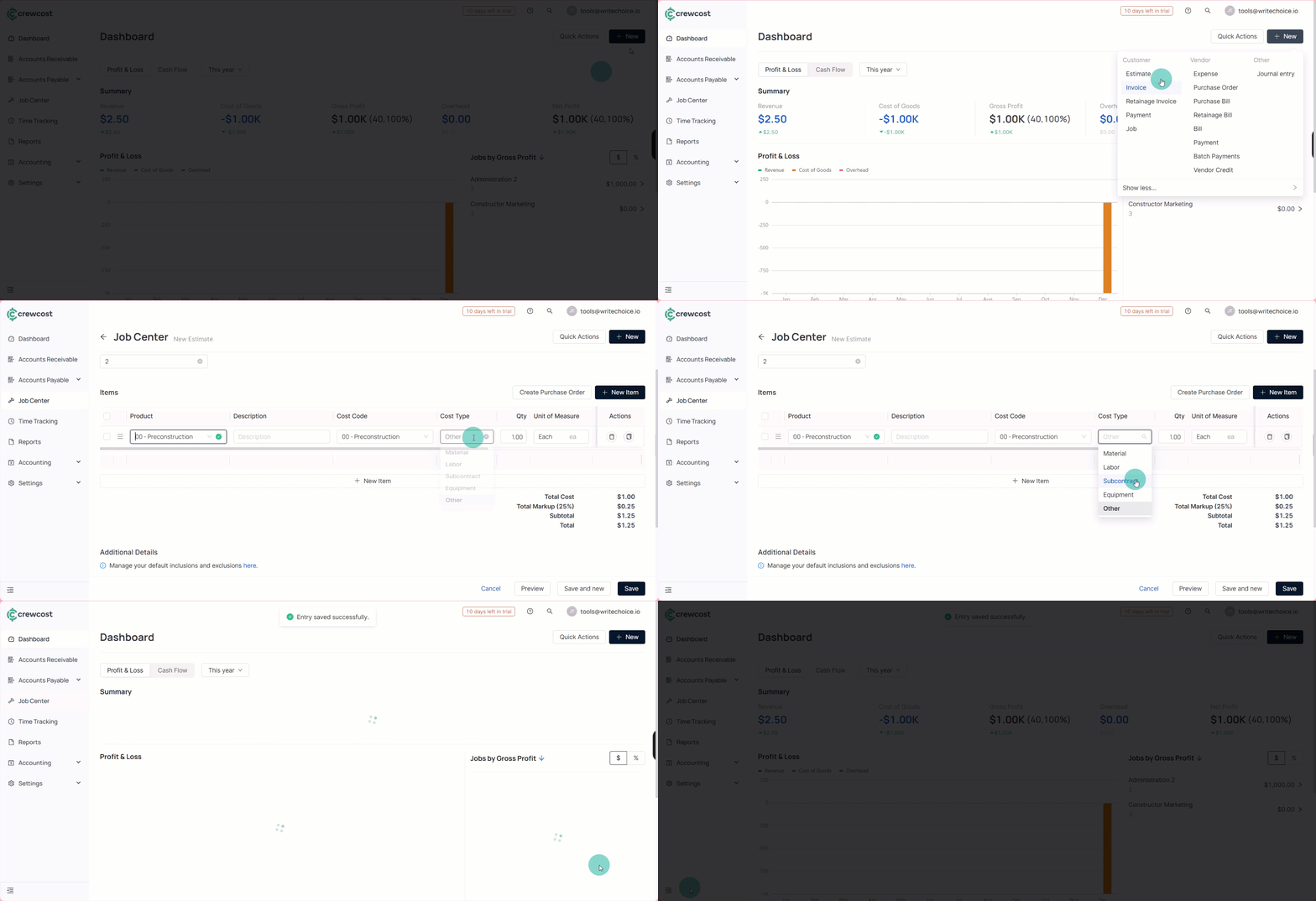
1. Create an estimate and select the appropriate **Cost Code** for each line item.
2. Choose a **Cost Type** to indicate how the cost will be incurred, such as **Labor** or **Materials**.
3. Enter quantities, unit costs, and markup, splitting a single **Cost Code** into multiple **Cost Types** when more detail is needed.
4. Submit the estimate and convert it into a job once the customer accepts it.
5. Review the job budget, which is automatically created from the estimate and retains the breakdown by **Cost Code** and **Cost Type**.
6. Enter bills and assign them to the correct job.
7. Submit the bill for approval and confirm that, once approved, the job budget is updated with actual costs.
This process ensures accurate tracking of planned versus actual costs throughout the project lifecycle. Using Cost Types consistently ensures that estimates, job budgets, and expenses stay aligned, giving you clear visibility into project costs from initial estimation through final billing.
### See also
Keep exploring our platform by taking the next step:
* [Add a New Cost Code](/documentation/work-breakdown-structure/add-a-new-cost-code.md): Learn how to create new cost codes, define their hierarchy levels, and understand how they help organize budgets, estimates, and job costs more accurately.
* [Manage Cost Codes / Names Overview](/documentation/work-breakdown-structure/manage-cost-codes-names.md): Learn how to review, edit, and maintain your cost code structure, including updating names, organizing multi-level codes, and ensuring consistency across estimates, jobs, and financial reporting.