> For the complete documentation index, see [llms.txt](https://docs.crewcost.com/llms.txt). Markdown versions of documentation pages are available by appending `.md` to page URLs; this page is available as [Markdown](https://docs.crewcost.com/documentation/job-center/add-contracts-and-contract-invoicing.md).
# Add Contracts and Contract Invoicing
This page explains how to create and manage contract invoices for a job. Contract invoicing lets you bill clients based on the agreed contract value, track retainage, and monitor billing progress over time. Using contract invoices helps ensure revenue is billed accurately and consistently with the contract terms.
### Add a Contract
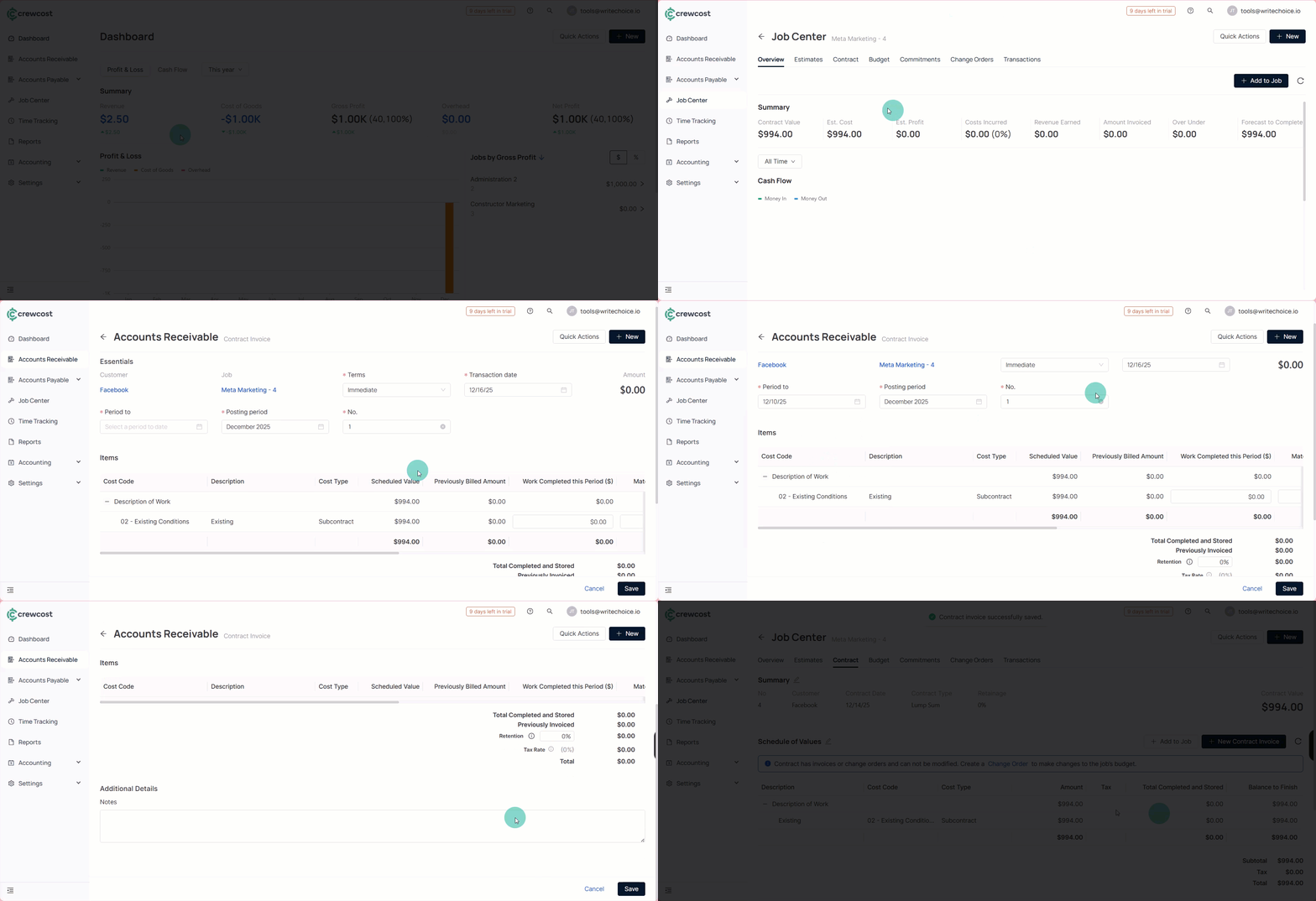
To create a **New Contract Invoice**:
1. Go to **Job Center**.
2. Select the **Contract** tab.
3. Select **+ New Contract Invoice**.
4. Fill in the required invoice information:
* **Terms**: Select the payment terms, such as Immediate, Net 15, Net 30, or Net 60.
* **Transaction Date**: The date the invoice is issued.
* **Period To**: The end date of the billing period covered by the invoice.
* **Posting Period**: The accounting period where the invoice will be recorded.
* **No.**: The invoice reference number.
5. In the **Items** section, review or edit the billing values:
* **Work Completed This Period ($)**: The value of work completed during the current billing cycle.
* **Materials Presently Stored**: The value of materials purchased but not yet installed.
* **Completed to Date**: The total value of work completed to date.
* **Total Retention**: The amount withheld based on the retainage terms.
* **Retention Rate (%)**: The percentage of the invoice value held as retainage.
6. (Optional) In **Additional Details**, add notes or comments to provide extra context for the invoice.
7. Select **Save** to complete the process.
### Edit an Existing Contract Invoice
To edit an existing contract invoice:
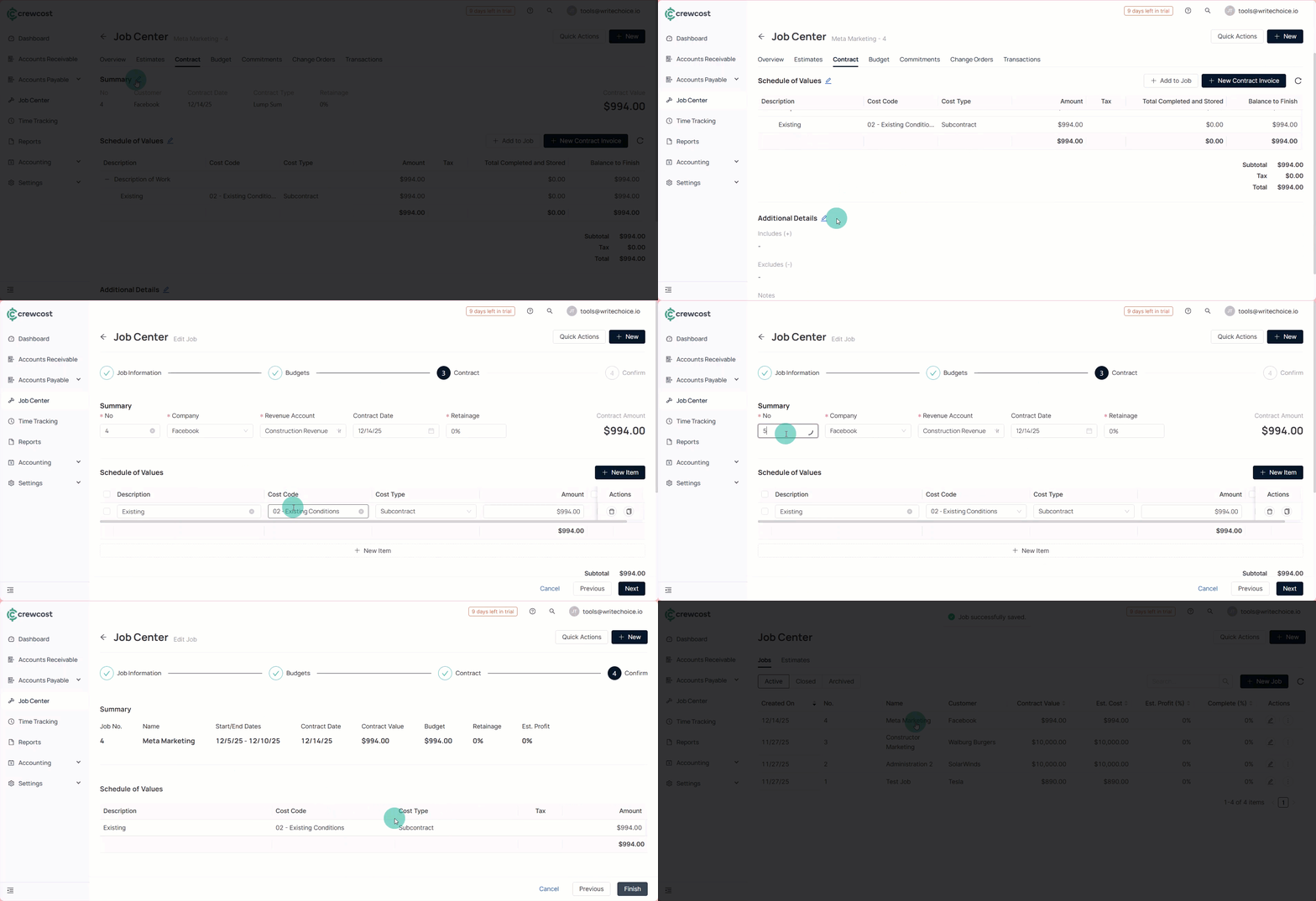
1. Open an existing contract invoice.
2. Select **Edit** in one of the following sections:
* **Summary**
* **Schedule of Values**
* **Additional Details**
3. When editing any of these sections, you can update:
* **No.**
* **Company**
* **Revenue Account**
* **Contract Date**
* **Retainage**
* **Schedule of Values**
* **Includes (+)**
* **Excludes (-)**
* **Notes**
4. Review the changes and select **Finish** to save your updates.
### See also
Keep exploring our platform by taking the next step:
* [Understand Job Budget Metrics](/documentation/job-center/understand-job-budget-metrics.md): Learn how to read and interpret job budget values such as original budget, revised budget, projected costs, and forecast to complete, and how these metrics help you monitor job performance.
* [Manage Prime Contract Change Orders](/documentation/job-center/manage-prime-contract-change-orders.md): Learn how to process scope changes that affect the prime contract, update job revenue, and keep budgets and forecasts aligned with the approved contract value.